How to find an old Bitcoin wallet: where to search, how to handle it and when to get help
Published: Last reviewed: How we edit
Finding an old Bitcoin wallet means looking for three things: wallet files like wallet.dat, devices and backups that may hold them, and written recovery words or old exchange emails. Search on copies only, keep the machine offline while you look, and check balances through public addresses alone. If a drive is broken or a file is locked, stop and get a specialist before attempting any repair yourself.
Got a question about your case? Ask us here:
Know what you are hunting for
Bitcoin does not expire. Coins you bought years ago still sit on the blockchain, at their addresses. The real target is the secret that controls them. It could be a wallet file, something saved on a device, a printed sheet, a list of words, or a login at an exchange.
You must first figure out what type of wallet you possessed. Think hard about when, where, and how you stored it. An exchange transaction implies an account. Desktop programs usually point to a local file. A physical hardware device relates to written recovery words. Now, start collecting your clues.
- Old emails from exchanges or wallet services: welcome notes, confirmations, withdrawal notices.
- Bank statements, card bills or payment records showing you bought Bitcoin.
- Old notes, paper notebooks, printed pages and photos of written things.
- Password manager records, logins your browser kept, and old chats with people you know.
- A list of every machine, phone, tablet and drive you touched back then.
Common wallet types and where their traces end up
Folder and file names change between programs, versions and operating systems. So search keywords and file names too, not just folders. The table shows typical patterns, it is not complete. A name alone proves little: other coins use files named wallet.dat as well, and the file may hold nothing.
| Wallet type | What to look for | Where it usually lives |
|---|---|---|
| Bitcoin Core, and its older version Bitcoin-Qt | A file called wallet.dat, or a wallets folder that contains it | The program's data folder inside the user profile, which many systems hide by default |
| Electrum | Wallet files that lack an obvious extension, often sitting in a wallets folder | A folder called Electrum or .electrum inside the user profile |
| MultiBit | Files ending in .wallet or .key, along with any backup copies | A MultiBit folder saved in the user profile, or inside a copy of that profile |
| Web wallet account | A wallet ID in an old email, together with the account password | Saved logins in your browser, a password manager, or your email inbox |
| Wallet app on a phone | The app, or a recovery phrase listed in its settings | Retired phones and tablets, plus backups on the cloud or a computer |
| Hardware wallet | A small physical device, usually paired with a card or paper sheet of recovery words | Drawers, safes, deposit boxes: anywhere the written backup sits apart from the device |
| Paper wallet | A printed page holding QR codes or long character strings | File folders, safes and deposit boxes, or a forgotten PDF or printout |
| Account on an exchange | Emails confirming purchases, statements, and withdrawal alerts | Your inbox, plus bank or card records showing the buy |
Where to look on drives and backups
Old wallets tend to sit in spots you quit checking long ago. Look in the obvious folders first, then expand to every backup you ever created.
Search the file system for names like wallet.dat and terms like bitcoin and electrum, with hidden files visible. Work from a copy of the drive, never the original.
- Computers, laptops and tablets gathering dust in a cupboard, an attic or a family member's home.
- Portable drives, flash sticks, SD cards and NAS drives on your network.
- Old wallet files can hide in system backups like phone backups, Mac backup drives, or Windows backup sets.
- Cloud accounts and sync folders, plus attachments you once emailed to yourself for safekeeping.
- Wallet software stored its files in hidden folders inside your user profile. Check there first.
- Look at paper: safes, deposit boxes, books, old filing folders.
Touch what you find: copies first, always offline
Protect the original before anything else. Copy every drive or file you find, then leave the original untouched somewhere safe. Open and work only on the copy.
Keep the machine offline while you inspect that copy. Old drives may hold malware, and wallet software can start syncing or sending data without your say-so. Never install recovery tools pulled from a search result or an ad.
Was the file deleted? Stop using that drive immediately. Anything you write now can cover the data you need. Never run repair or undelete tools on the original. A specialist will image the drive exactly before touching it.
- Never upload a wallet file, phrase or key to any website, balance checkers included.
- Recovery words and keys never go into a search box or a chat, even when you want advice.
- Maintain a simple record of what you discovered. Note the location, timing, and steps you took.
- Mark every copy clearly, and store one spare on a separate device.
Look for funds without risking your secrets
Addresses are public. If you find a list of addresses, a block explorer can show each one's balance and history. Coins sitting at an address prove the coins are real. They prove nothing about who holds the keys now. Run the lookup on a different device than the old computer, and move across only the addresses.
Never enter a phrase or a private key into an explorer or balance checker. If written recovery words turn up, restore them only in a current wallet app from the maker's official site, on a clean device, then match the first address it shows against one you know.
After you confirm the funds exist, move them into a new wallet you set up yourself, with a fresh backup. Old coins sent to an exchange can trigger questions about their origin, so collect your old purchase records first.
When the wallet is locked, broken or lost
A wallet file may demand a password you forgot. A drive may fail to start. A file may be corrupt. These are technical problems, and every wrong attempt lowers your odds, so go slow before attempting repairs on your own. Stop and contact a specialist if you notice any sign listed below.
- A drive that won't power on, makes odd noises or shows errors.
- A wallet file that wants a password you forgot, where you recall parts of it.
- A deleted file, or a drive that got wiped or reformatted.
- A device or file using a format you cannot identify.
- A significant amount, or an old device that also counts as evidence in a dispute or an estate.
Bringing in a specialist, and who to steer clear of
Independent specialists can create an image of a damaged drive, pull back deleted files and try likely passwords against a copy of a wallet file. A solid engagement comes with a written scope, works only on copies, keeps the funds under your control and never asks for your seed phrase. Fees are frequently linked to success, but terms vary, so read them before you agree.
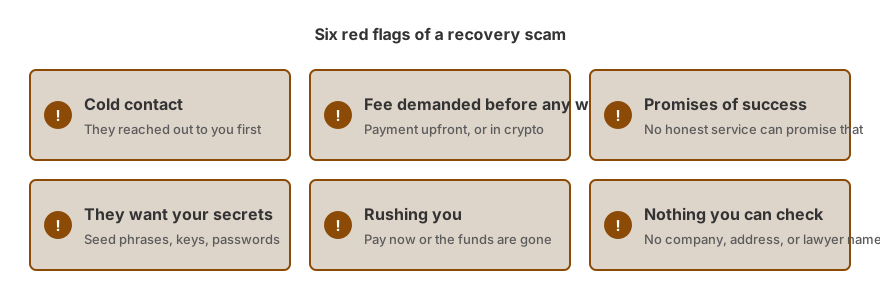
Here is the hard part: anyone who contacts you first is a red flag. Same if they want payment up front, remote access to your devices, or talk like success is certain. And if someone claims they can see your lost Bitcoin and just needs a fee to unlock it, that is a scam. Walk away.
If a route looks realistic, we say so in writing and coordinate independent specialists. We help you sort out what you actually hold first. The assessment costs nothing, and fees come up only after we have told you whether we can help. Nobody can promise to find a wallet or open one, and we will never ask for your seed phrase, private keys or passwords.
Frequently Asked Questions
Will my old Bitcoin still exist after so many years?
Bitcoin never expires. The coins sit at their addresses for as long as the network exists. What you can lose is your own way in: a missing file, a broken device, or words you wrote down and cannot find. So the real question is simple. Can you still locate the secret that gives you control?
Is there a way to look up what an old address still holds?
Paste the address into a block explorer. Public addresses carry no risk to check. Any balance checker that asks for your seed phrase or private key is a red flag: walk away. Also know this: a balance only proves the coins are there, not that you can move them.
Is a file called wallet.dat always holding Bitcoin?
Not always. Several coins share that file name, and the wallet may be empty or contain just loose change. Treat what you found as a lead, nothing more. Save a copy, then let someone with real experience look at that copy before you decide anything.
Could I install the old wallet software and open that file?
It is possible, but only offline, on a duplicate, using a download straight from the maker's official site. Certain programs alter a wallet file the moment they open it. That is exactly why the untouched original should stay stored somewhere safe.
Would a data recovery shop be the right place for the old machine?
First ask them, in detail, what happens to the drive and the data on it. Request a written scope, ask that the work be done on an image, and never share passwords or a seed phrase. Any shop that actually understands wallets will accept these terms without complaint.
How we can help
- Recovering wallet passwords and files. Forgotten password or broken wallet file: checked independent specialists attempt recovery.
- Help with recovering a hardware wallet. Hardware wallet issues: honest guidance and vetted lab options.
- Crypto inheritance and lost access support. Legal paths to access crypto for those who have died or lost capacity.
- Proof of funds and wealth origin packs. Prepare a clean source of funds and source of wealth pack that exchanges, banks and processors will accept.
Everything on this page is general information. It is not legal advice.